CDSSO Palladium Integration
CDSSO Enables transparent multi-site login for the user using a centralized service that handles Amazon Cognito sessions and sets cookies to the user browser. This document tries to give information about what configurations and changes are needed to do in order to integrate this service. If you have doubts about some terms, jump and read the terms section.
If you need to know last changes in this guide, look at document changelog.
Document Index
- Integration guide, an step-by-step guide to integrate this service.
- Integration summary and examples.
- Glossary of terms.
- FAQ
1. Integration guide
There are two steps to integrate the CDSSO in your web application:
- Add the CDSSO JS Script in the HTML.
- Change the login URLs (Hosted UI/Form/Social auth) and the logout URL of your APP
- Implement 2 URLs , login and logout, in your application following the standard Amazon Cognito implementation.
1.1 Integrate the CDSSO at the browser
To integrate the CDSSO with Cognito it's necessary to include the following two <script> tags in the HTML DOM:
JS Script
Add the following script
<script
id="cdsso-rewards"
src="{{ENVIRONMENT_URL}}/js/cdsso.js"
data-cdsso-url="{{ENVIRONMENT_URL}}"
data-user-authenticated="{{USER_AUTHENTICATED}}"
data-redirect-uri="{{DATA_REDIRECT_URI}}" <!-- Optional --></script>and fill the variables that the JS script will use to perform the CDSSO operations:
- USER_AUTHENTICATED: Boolean that indicates if the user has an active session or not in the current application. This value MUST BE rendered in the template from the application backend.
- DATA_REDIRECT_URI: (Optional) This url is sent by the CDSSO Service as GET parameter (redirect_uri) (along with the 3 JWT Tokens)
- DATA_LOGOUT_REDIRECT_URI: (Optional) This url is used to make a redirect when the /check detects an invalidated session instead of the application default. IMPORTANT: If it's used, it has to be set to the /login button or link that points to the CDSSO Service login as GET parameter too. See redirect_uri in /login URL. For example, for the live environment: https://api.rewards.aws.palladiumhotelgroup.net/login?redirect_uri=
- DATA_AJAX_LOGOUT_URI: (Optional) Url to do a request by in case the logout is detected and is made with AJAX. IMPORTANT: This is not the URL that integrators have to use when doing the first logout.
- DATA_AJAX_LOGOUT_METHOD: (Optional) "get" or "post" for the AJAX request when logout is done and the service redirects to the APP's logout URL.
- ENVIRONMENT_URL:
- Staging environment: https://api.rewards.stage-eu.aws.palladiumhotelgroup.net
- Live environment: https://api.rewards.aws.palladiumhotelgroup.net
Live environment example
  <script
    id="cdsso-rewards"
    src="https://api.rewards.aws.palladiumhotelgroup.net/js/cdsso.js"
    data-cdsso-url="https://api.rewards.aws.palladiumhotelgroup.net"
    data-user-authenticated="{{USER_AUTHENTICATED}}"
    data-redirect-uri="{{DATA_REDIRECT_URI}}"
    data-logout-redirect-uri="{{DATA_REDIRECT_URI}}"
    data-ajax-logout-uri="{{DATA_AJAX_LOGOUT_URI}}"
    data-ajax-logout-method="{{DATA_AJAX_LOGOUT_METHOD}}"
    crossorigin="anonymous"></script>
Staging config example
  <script
    id="cdsso-rewards"
    src="https://api.rewards.stage-eu.aws.palladiumhotelgroup.net/js/cdsso.js"
    data-cdsso-url="https://api.rewards.stage-eu.aws.palladiumhotelgroup.net"
    data-user-authenticated="{{USER_AUTHENTICATED}}"
    data-redirect-uri="{{DATA_REDIRECT_URI}}"
    data-logout-redirect-uri="{{DATA_REDIRECT_URI}}"
    data-ajax-logout-uri="{{DATA_AJAX_LOGOUT_URI}}"
    data-ajax-logout-method="{{DATA_AJAX_LOGOUT_METHOD}}"
    crossorigin="anonymous"></script>
JS Sentry
This piece of code is for helping us to debug incidents with the library. This can be added to both staging and live environments.
Sentry won't collect user nor web data, only exceptions that occurred in the JS script.
  <script
    src="https://browser.sentry-cdn.com/5.16.1/bundle.min.js"
    integrity="sha384-XeIbINcUQP10HtmVHwZigannjNDpoQRe+uhAoW9J5HU5dHFpilP164LjqO78xtIB"
    crossorigin="anonymous"
  ></script>
1.2 Change the login URLs (Hosted UI/Form/Social auth) and the logout URL of your APP
You need to replace login URLs in your application using cognito Hosted UI, form or social auth.
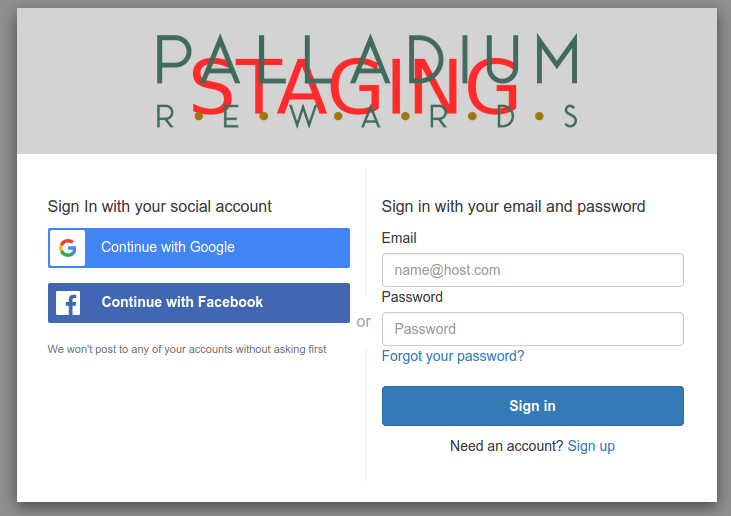
This screenshot shows the login form inputs. The submit button must send a POST request to the login url: https://{{ENVIROMENT_URL}}/login/form/
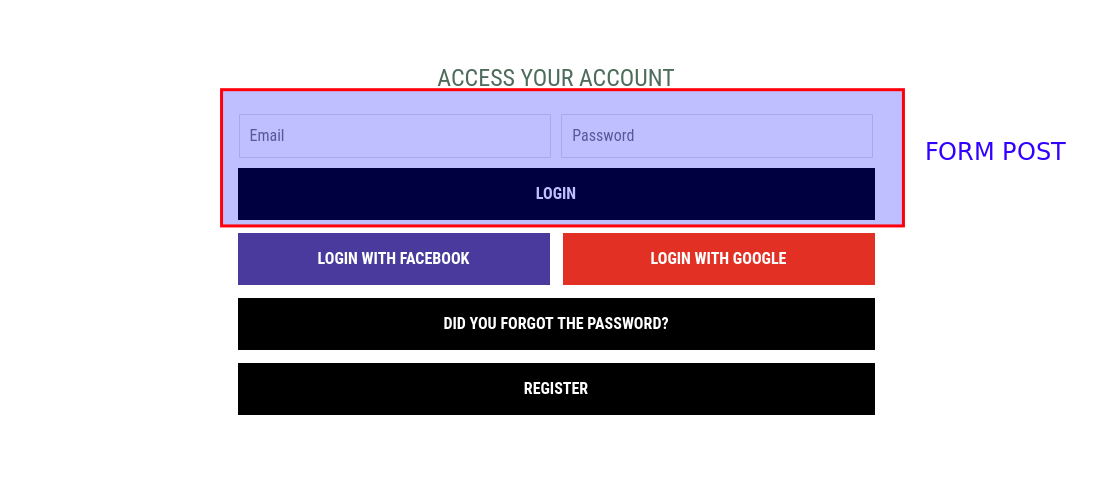
You can see on the screenshot social login buttons (Facebook and Google). These buttons must be configured to open CDSSO configured social auth urls.
1.3 Amazon Cognito authentication in the backend side
You must implement the Amazon Cognito authentication in order to unify and store user data in your own authentication system.
For Django, we modified the library drf-cognito-code-grant to authorize the user after being authenticated via Amazon Cognito with the CDSSO Service:
CDSSO Login and Logout URLs
Your application must implement two endpoints login and logout to handle Cognito authentication tokens. We'll refer to these urls with Auth URLs (See the next section Auth URLs to know how to implement Cognito authentication in the backend side).
The CDSSO Service also implement the Login and Logout urls and they are going to be called by the user to login or logout with Amazon Cognito. The CDSSO Service is going to manage the central auth tokens by itself setting a cookie in the user browser.
To use the CDSSO auth flow. It's important to change your app Login URLs and Logout URL to point directly to the CDSSO Service. These urls are:
- CDSSO Hosted UI Login URL:
{{ENVIRONMENT_URL}}/login/. In case you want to use the Cognito Hosted UI - CDSSO Login Form URL (POST):
{{ENVIRONMENT_URL}}/login/form/. In case you use your own form to login the user. - CDSSO Social Login:
{{ENVIRONMENT_URL}}/oauth2/authorize/. In case you use Social Auth Providers like Google or FB. - CDSSO Logout URL:
{{ENVIRONMENT_URL}}/logout/. To invalidate the central session.
There are examples and more detailed explanation in the section below.
Three login methods, Login (Hosted UI) and Login Form (POST Request)
Login (Hosted UI)
Simply a link you can use to redirect the User to the Amazon Cognito Hosted UI to perform the login operation.
Example: {{ENVIRONMENT_URL}}/login/
Login Form (POST Request)
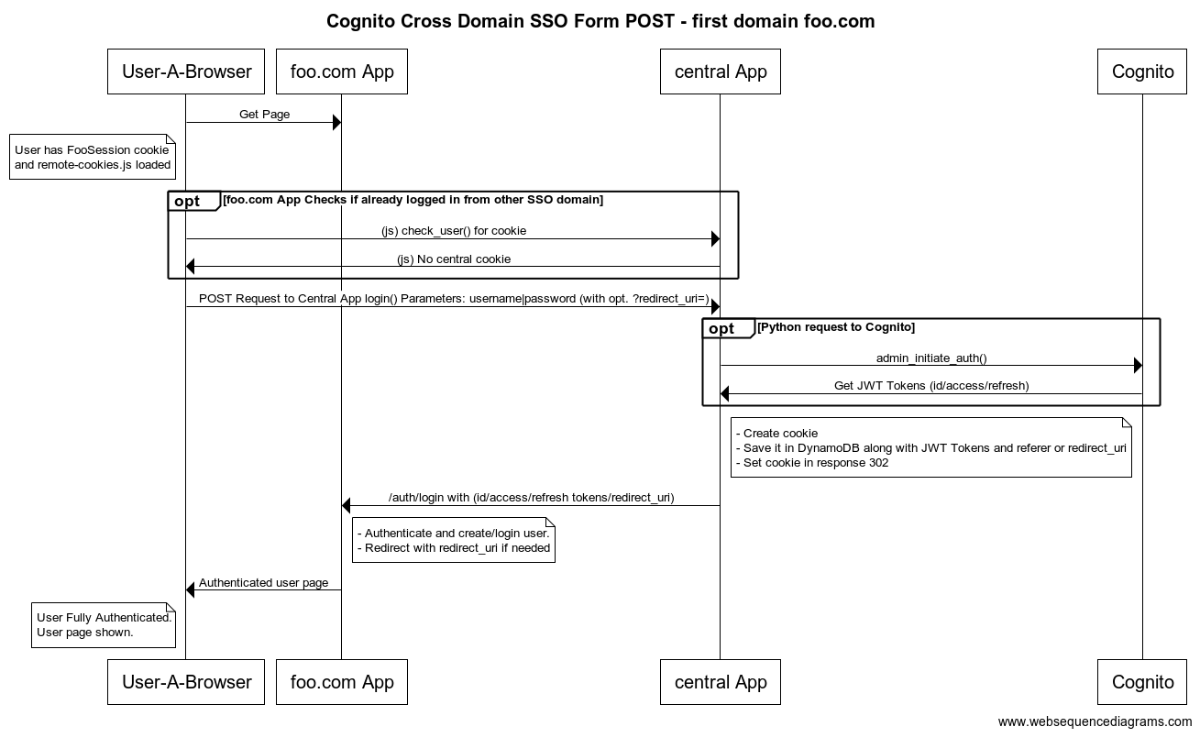
With this URL you can send a POST Request using a form or AJAX. The parameters are:
- "username" or "email"
- "password"
Example:
{{ENVIRONMENT_URL}}/login/form/
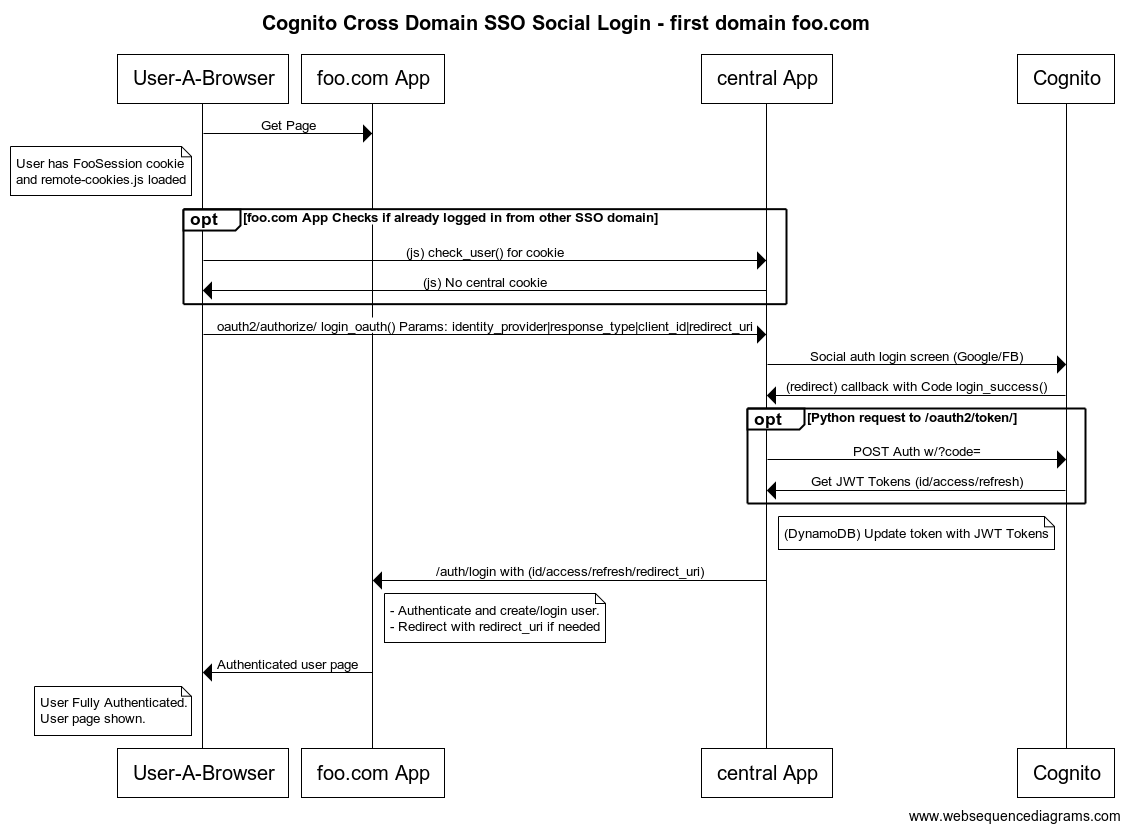
Social Login (Social provider Hosted UI)
Link to CDSSO with the same parameters as Cognito's /oauth2/authorize/:
- "identity_provider"
- "response_type". Must be: "code"
- "client_id". Must be the same as the CDSSO COGNITO APP ID
- "redirect_uri"
Example:
{{ENVIRONMENT_URL}}/oauth2/authorize?response_type=code&identity_provider=Google&client_id=54vomunmomdf85a9v9mh477702&redirect_uri=https://django.192.168.1.159.nip.io/auth/login/&scope=email%20openid%20profile"
The redirect_uri GET parameter in /login/ and /login/form/ URLs
Optionally, you can define a redirect_uri GET parameter when setting the LOGIN URL anchor.
This behaviour is explained in the JS Script Variables section.
An ajax session logout
Additionally, you can use an alternative logout url if you design a ajax logout in your application.
- Alternative CDSSO Logout URL:
{{ENVIRONMENT_URL}}/xhr/logout/
This, unlike logout url, does not respond with a 302 response redirect but with a json in which its status is reflected. It is the responsibility of your application to close the user's session.
Unified CDSSO Logout
When the /logout URL is called from a website, the cookie will be set as INVALIDATED and when user is going to visit the second web page, if it's authenticated yet, it will be automatically redirected to site logout URL.
Auth URLs
These two URLs are not going to be called by the user directly but from the CDSSO Service.
The app is not going to do any request to Amazon Cognito directly because this is handled by the CDSSO Service. Beside that, the app must implement two urls (login/logout) that handle Cognito authentication with tokens.
LOGIN URL

The app must have a login URL that receives three JWT tokens as GET parameters from the CDSSO Service:
- id_token
- access_token
- refresh_token
From this, you have to follow the standard Cognito implementation, validating and decoding these 3 tokens, creating/getting a user and authenticating it in the app.
Step 1
Collect GET parameters: id_token, access_token, refresh_token.
Step 2
Validate the tokens (you will need the COGNITO_APP_ID here) and decode these 3 JWT tokens. This is the part you have to implement of a standard Cognito implementation.
For Django, you can use a library that APSL has implemented and published on github: drf-cognito-code-grant.
Step 3
The decoded id_token has an username and an email that you will need to handle the app authentication.
Create a new user with the decoded token info or get an existing one from the database.
Authenticate it.
https://docs.aws.amazon.com/cognito/latest/developerguide/scenario-backend.html
Step 4
Make a redirect to the home or profile page with the active user session.
LOGOUT URL

Your app must call to {{ENVIRONMENT_URL}}/logout of the CDSSO Service to invalidate the session and return the control of the logout endpoint of you app. It will be triggered from the CDSSO Service when the /logout CDSSO URL is called.
How logout does work?
When calling /logout, the CDSSO Service is going to check if the cookie value is in the database and invalidate it. After that, CDSSO Service is going to redirect to the App's logout URL.
When visiting a 2nd domain, the JS's check will receive an invalidated cookie response. If the user is still authenticated in the site, the JS will make a redirect to the App's logout URL. IMPORTANT: This flow is going to happen in every site that integrated the CDSSO Service.
IMPORTANT
To be able to encode and decode the JWT tokens, all the applications implementing the CDSSO must have the same COGNITO APP ID.
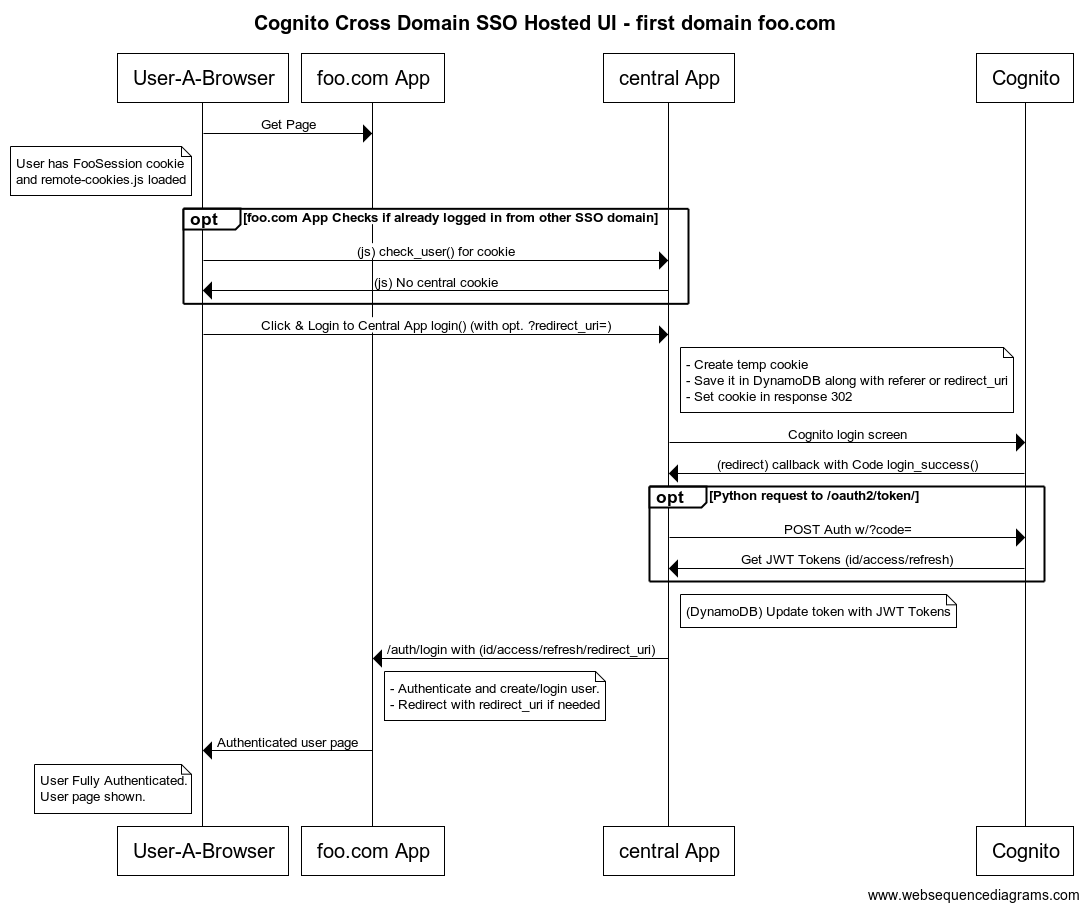
Authentication flow
First domain
Hosted UI
Form POST
Social Login
Second domain
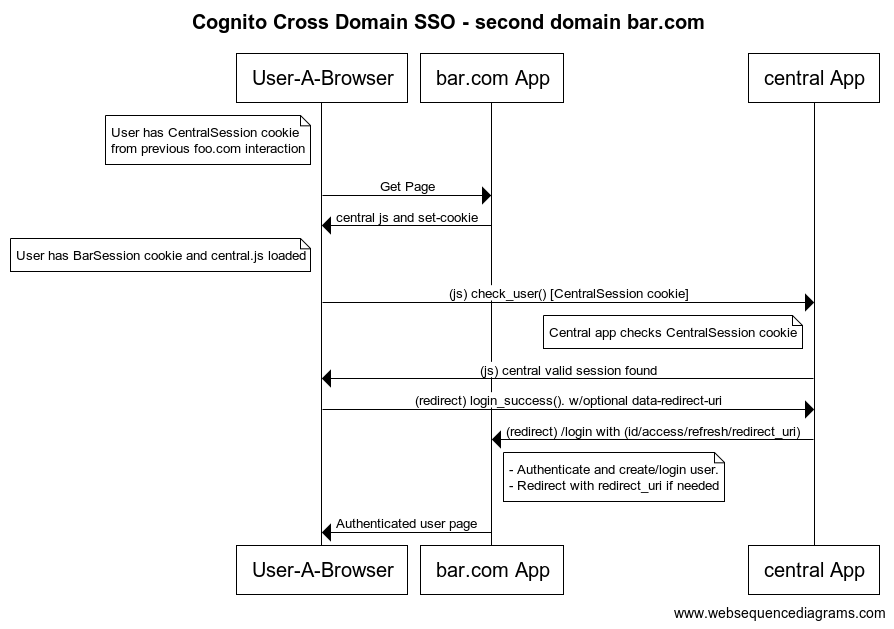
Summary & Examples
In summary, to integrate you app with CDSSO Service you must add the scripts mentioned above. Implement a login and logout callbacks previously specified and finally make sure the user use the CDSSO Service login and logout endpoints to authenticate and log out respectively.
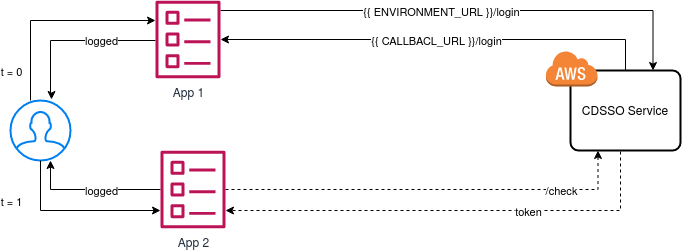
Steps to integrate a django app with the CDSSO service.
As explained in point 1 of the current documentation, you add in the "base" template (django template used in all views) the following scripts with the required data:
- data-cdsso-url: Url of the CDSSO service according the environment.
- data-user-authenticated: Boolean value that indicates whether the user is logged into your app at all times. This means that once the user is authenticated against your app, according the response of the CDSSO service, it must reflect the status to True; otherwise False.
# base_template.html

  <script
    src="https://browser.sentry-cdn.com/5.16.1/bundle.min.js"
    integrity="sha384-XeIbINcUQP10HtmVHwZigannjNDpoQRe+uhAoW9J5HU5dHFpilP164LjqO78xtIB"
    crossorigin="anonymous"></script>

  <script
    id="cdsso-rewards"
    src="https://api.rewards.stage-eu.aws.palladiumhotelgroup.net/js/cdsso.js"
    data-cdsso-url="https://api.rewards.stage-eu.aws.palladiumhotelgroup.net"
    data-user-authenticated="{{ user.is_authenticated }}"
    crossorigin="anonymous"></script>
Adapt your templates to show that the user is logged in or not (if you have not already implemented it) and you will change the login/logout URLs for authentication to those of the CDSSO service (as indicated in login/logout urls
# menu.html

<li class="login-menu">
  {% if request.user.is_authenticated %}
    <a href="{{ setting.cdsso_logout_url }}">
      <span class="button">
        {% trans 'Log me out' %}
      </span>
    </a>
  {% else %}
    <a href="{{ settings.cdsso_login_url }}">
      <span class="button">
        {% trans 'Log me in' %}
      </span>
    </a>
  {% endif %}
</li>
In addition, you must implement the authentication endpoints for login and logout. You can implement a custom Django Authentication Backend to suit Cognito specifications or you can also use one of the one that APSL has implemented and published on github: drf-cognito-code-grant.
# settings.py

REST_FRAMEWORK = {
    'DEFAULT_AUTHENTICATION_CLASSES': (
        'cognito_code_grant.authentication.CognitoAuthentication',
    )
}

LOGIN_URL = "https://api.rewards.stage-eu.aws.palladiumhotelgroup.net/login/"
LOGOUT_URL = "https://api.rewards.stage-eu.aws.palladiumhotelgroup.net/logout/"
# urls.py
# Cognito - only for login.
url(r'auth/', include_auth_urls()),
# Auth - only for logout, login with cognito.
url(r'accounts/', include('django.contrib.auth.urls')),Finally, you must necessary to provide those responsible for the SSO service with the login and logout callback urls so that the service knows how to manage redirects.
Example of network requests
1st domain: https://ushuaia.staging.k8s.apsl.net/
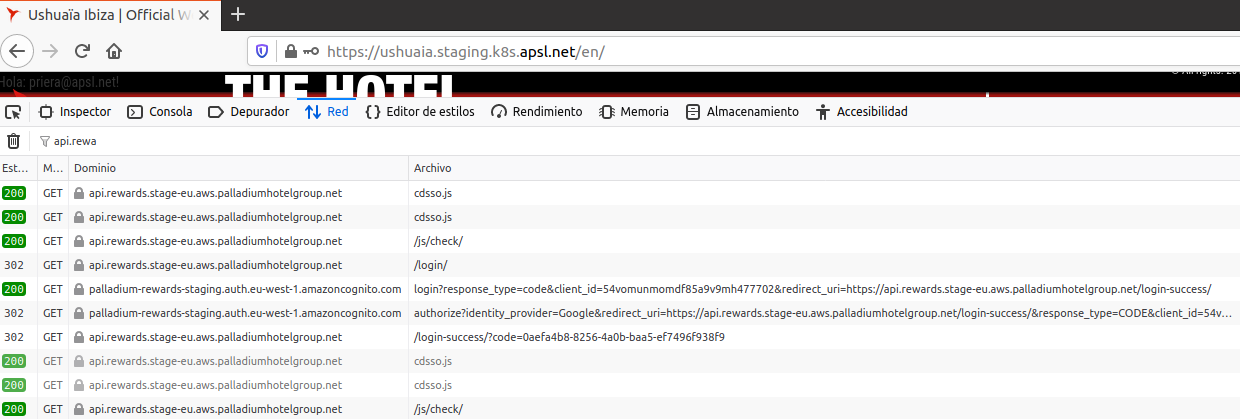 (App 1 on the previous schema)
2nd domain: Local Django App
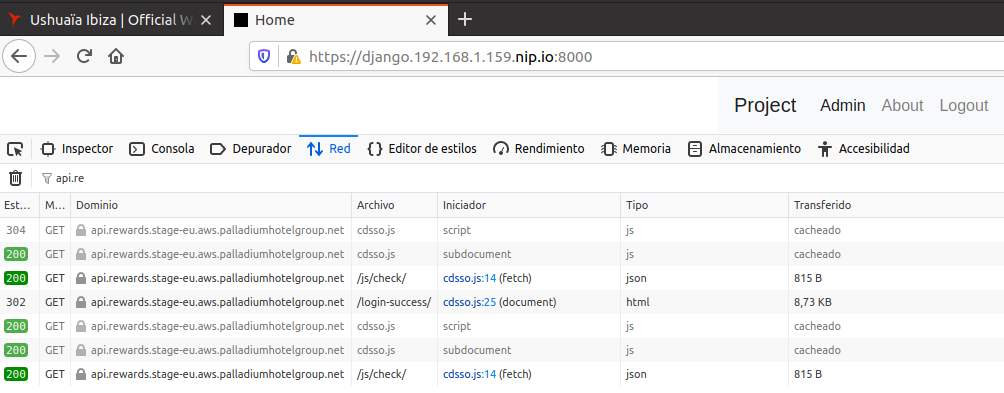 (App 2 on the previous schema)
Glossary of terms
1. What are the callback URLs?
There are two callback URLs. One of them for the login and the other for application logout.
- Review Return url.
2. What are uls callback for?
The login and logout URLs implemented in your application are used so that the CDSSO service can redirect the response after authenticating against the Cognito service and return the information that allow you identify the user. In this way, the return urls must be in charge of treating the user's data for the purpose of each one.
3. What is the hosted UI?
This represents the endpoint against which the end user will login, the Cognito Service SSO interface:
FAQ
1. Safari current status
1.1. Why do we use a browser redirect in the first iteration?
Because of ITP 2.3, Safari by default discards cookies set by another domain. This behaviour only happens in normal browsing mode but not in incognito mode. Also, because of Safari behaviour, a control cookie (checksettempcookie) is set in the app domain to avoid infinite redirects.
1.2. Safari infinite redirects workaround
When an user loads a web with implemented CDSSO with Safari this is what happens:
- CDSSO makes a call to check if there is any central cookie in the browser.
- CDSSO Service responds with status "no_cookies".
- The JS sets a control cookie (checksettempcookie) of the web domain and redirects to /set-temp-cookie trying to set the Central Cookie.
- CDSSO Service redirects again to the origin but Safari won't set the cookie.
- Because of the "checksettempcookie", the browser won't try to set the temporal cookie again.
Specification: https://webkit.org/blog/9521/intelligent-tracking-prevention-2-3/
2. How can I test the complete workflow with a 2nd domain?
We have prepared a staging Ushuaia environment with the CDSSO activated in: https://ushuaia.staging.k8s.apsl.net/
3. What is the relationship between the CDSSO service and the AWS Cognito service?
The CDSSO service is a layer of software that is responsible for managing requests from multiple web applications. This service is ahead of the Cognito service and checks if a user X is logged in to a central system, so that if this same user X accesses another application included in the CDSSO, the user authenticates automatically.
See the diagrams:
- [login] (# login-url)
- [logout] (# logout-url) We can say that it acts as a Cognito proxy.
4. What should we change if we do not want CDSSO authentication?
In this case, you must eliminate the scripts in the application templates and change the login and logout urls that point to the CDSSO service. You must also follow the instructions in the official documentation to integrate the Cognito service. Note: You can keep the implemented callback urls. The managed data of Cognito and CDSSO services are identically.
Document changelog
This changelog will help you to review recent updates on the documentation
| Date | Change explanation |
|---|---|
| 2020-09-22 | Added new second point to implement social auth and login with a form (POST http request). |
Contact
Email: PHG support